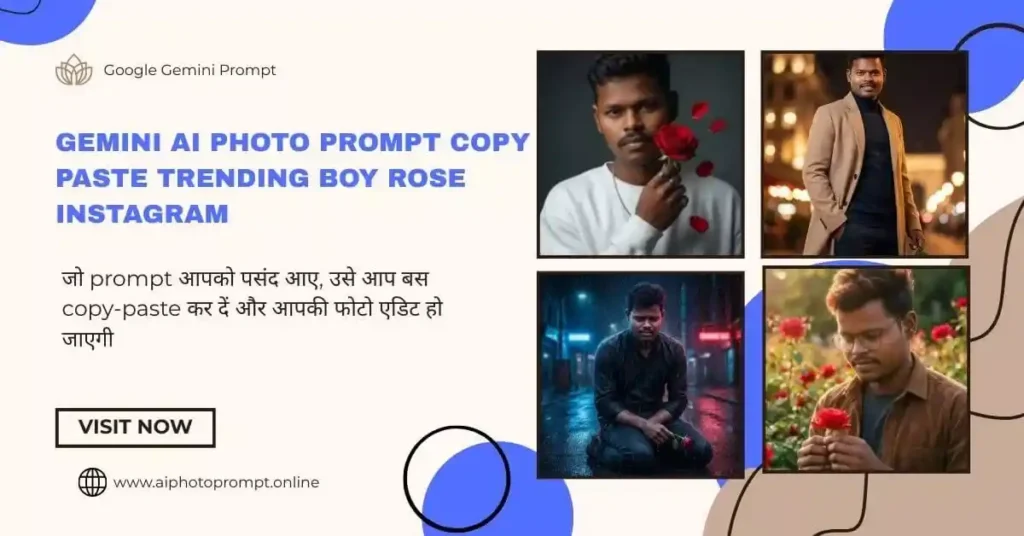
क्या आपने हाल ही में Instagram Reels या Facebook पर वो वायरल फोटो देखी है जिसमें एक लड़का हाथ में गुलाब (Rose) लिए खड़ा होता है? वो फोटो इतनी रियल और क्यूट लगती है कि हर कोई सोचता है, ” यार, ये फोटो बनाते कैसे हैं?”
अगर आप भी इंटरनेट पर Gemini AI photo prompt copy paste trending boy rose Instagram ढूंढ रहे हैं, तो आप बिल्कुल सही जगह पर आए हैं।
आज के इस आर्टिकल में, मैं आपको वो एग्ज़ैक्ट प्रांप्ट (Prompts) दूंगा जिन्हें बस कॉपी और पेस्ट करके आप Google Gemini से अपनी खुद की वायरल फोटो बना सकते हैं। और सबसे अच्छी बात? यह बिल्कुल फ्री है और इसे करने में सिर्फ 2 मिनट लगेंगे!
यह “Boy with Rose” वाला Trend इतना Viral क्यों है?
आजकल Instagram पर इमोशनल और रोमांटिक रील्स (Reels) का बहुत क्रेज है। लोग अपनी फिलिंग्स शेयर करने के लिए सिर्फ़ गानों का नहीं, बल्कि ऐसी AI images का भी इस्तेमाल कर रहे हैं जो उनकी फीलिंग्स को दिखा सके।
- इमोशनल कनेक्शन: हाथ में गुलाब लिए लड़का कभी प्यार का इजहार करता है, तो कभी टूटे दिल (Heartbreak) को दिखाता है।
- यूनिक स्टाइल: यह फोटो असली नहीं होती, लेकिन Google Gemini जैसी AI Software इसे इतना “Realistic” बना देती है कि पहचानना मुश्किल हो जाता है।
इसलिए, अगर आप भी अपनी प्रोफाइल के लिए Boy with rose AI image बनाना चाहते हैं, तो नीचे दिए गए प्रॉम्पट्स (Prompts) का इस्तेमाल करें।
Top 10 Gemini AI photo prompt copy paste trending boy rose Instagram List
यहाँ मैंने अलग-अलग मूड के हिसाब से प्रॉम्पट्स दिए हैं। आपको जो भी स्टाइल पसंद हो, उस प्रांप्ट (prompt) को कॉपी करें और Gemini AI में पेस्ट करे।
1. Sad/Emotional Boy (Sad Status के लिए)
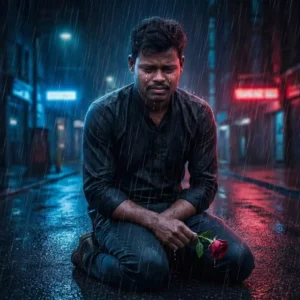
A full-body shot of a lonely boy sitting on his knees in the rain, holding a wilted rose in his hand. Keep the uploaded face 100% the same with clear visibility—add soft front lighting so the identity remains unchanged. The boy is crying, with tears running down his cheeks, watery eyes, and a deeply emotional expression that naturally matches the heartbreaking rainy environment. Shoulders slightly shaking, head tilted forward, showing pain and sadness. Maintain a dark, moody atmosphere with blue and black tones. The background shows a rainy city street at night with neon reflections on the wet ground. Do not change or stylize the face—only adjust the expression to match the emotional scene.
2. Cinemati Rose Field Potrait

Create an ultra-realistic cinematic portrait using the uploaded face with 100% accuracy. Preserve all natural facial features, skin tone, beard style, and the exact hairstyle from the uploaded photo.
Scene: the boy is standing in a rose garden during golden hour, surrounded by vibrant red roses.
Pose: holding a single red rose gently with both hands, head slightly lowered as he admires it with computer round eyeglasses.
Expression: calm, romantic, soft-focus mood.
Lighting: warm golden-hour sunlight with soft shadows, creating a dreamy cinematic tone.
Outfit: casual earthy-toned shirt layered over a simple inner T-shirt (similar to the reference).
Background: blurred rose field with warm tones and subtle bokeh for a film-like atmosphere.
Aesthetic: natural, cinematic, emotional, with high detail and soft warm grading.
Ensure the uploaded face is blended perfectly without altering facial structure or hairstyle.
3. Realistic Indian Boy (Instagram Profile के लिए बेस्ट)
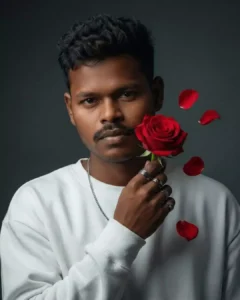
Create a surreal, ultra-detailed portrait of a young man using the uploaded face with 100% accuracy. Keep all natural facial features exactly the same and match the hairstyle to the uploaded image — short, slightly spiked, naturally textured hair as shown in the reference. He is holding a vibrant red rose close to his face, with 3–4 rose petals floating around it to create a moody cinematic atmosphere. Outfit: plain oversized white sweatshirt and a thin silver chain necklace. His fingers have multiple rings. Background: minimalistic, soft shadowy backdrop that highlights his presence without distraction. Maintain realistic skin tone, facial hair, and expression exactly as in the uploaded face. Lighting should be soft, cinematic, and flattering.
4. Full-Body Cinematic Standing Pose

Full-body 8K cinematic shot using the uploaded face. Subject standing hero-style, one hand holding a rose, the other in pocket. Light smile. Camera angle: slightly low hero angle. Background: soft romantic lights with warm tones. Outfit: beige overcoat + turtleneck. Keep facial features 100% accurate.
Stylish Cinematic Rain Scene Prompt
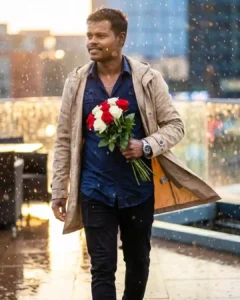
8K ultra-realistic HDR cinematic portrait of a handsome young man walking slowly through gentle rain, wearing a more stylish outfit: a deep navy slim-fit shirt (wet and naturally clinging), black tapered jeans, layered with a lightweight open beige raincoat flowing behind him for a dramatic hero look. He holds a bouquet of fresh red and white roses close to his chest. Camera angle: slightly low front-side hero angle, focused on upper-body, face turned slightly left with a soft confident expression. His eyes look gently toward someone in the distance, giving a romantic, emotional connection. Pose: walking with relaxed shoulders, one hand holding the bouquet, the other lightly brushing through the rain. Accessories: silver wristwatch, thin silver chain, and subtle rain-glow reflections on skin and clothes. Expression: soft closed-lip smile mixed with warm emotion — like he feels love in that moment. Lighting: cinematic blend of golden-hour highlights and cool blue rain light, water droplets sparkling on face, hair, and clothes; subtle lens flare behind him. Background: blurred rainy rooftop terrace with warm yellow-orange city lights reflecting in puddles, soft bokeh and motion blur in falling rain. Mood: romantic, stylish, emotional — a perfect movie-scene shot in the rain. Aesthetic: ultra-detailed skin texture, dynamic rain particles, HDR sharpness, soft depth-of-field, film-grade contrast. Face: keep EXACTLY the same as the uploaded image — same features, skin tone, hairstyle, only slightly turned with no changes.
Viral AI Photo Prompts: अपने Simple Photos को Viral बनाने के Trending AI Ideas
Google Gemini से Free में Photo कैसे बनाएं? (Step-by-Step)
अगर आप पहली बार AI यूज़ कर रहे हैं और इमेज एडिट करना चाहते है, तो चिंता न करें। बस इन आसान स्टेप्स को फॉलो करें:
- Google Gemini खोलें: अपने फोन या लैपटॉप में Google पर सर्च करें “Google Gemini” और पहली वेबसाइट खोलें। (या आप Google Photos या Imagen 3 टूल भी यूज़ कर सकते हैं)।
- Login करें: अपने Gmail अकाउंट से लॉगिन करें।
- Prompt पेस्ट करें: ऊपर दिए गए लिस्ट में से अपना पसंदीदा Gemini AI photo prompt copy paste करें।
- Generate पर क्लिक करें: बस एंटर दबाएं और 10-20 सेकंड इंतज़ार करें।
- डाउनलोड करें: Gemini आपको फोटो बनाकर दे देगा, फोटो पर लॉन्ग प्रेस करके या राइट क्लिक करके “Download Image” कर लें।
Pro Tip: अगर आपको शर्ट का कलर बदलना है, तो प्रॉम्पट में जहाँ “White Hoodie” लिखा है, उसे हटाकर “Black Shirt” या “Blue Jacket” लिख दें। AI समझ जाएगा!
अपनी AI Photo को Instagram के लिए Edit कैसे करें?
सिर्फ फोटो बनाना काफी नहीं है, उसे वायरल करने के लिए थोड़ी एडिटिंग भी बहुत जरूरी है।
- Face Swap (चेहरा बदलें): अगर आप चाहते हैं कि फोटो में लड़के का चेहरा आपके जैसा दिखे, तो “Remaker AI” नाम की वेबसाइट पर जाएं। वहाँ अपनी फोटो और AI फोटो अपलोड करें, वो चेहरा बदल देगा।
- Music लगाएं: Instagram पर अपलोड करते समय हमेशा “Trending Audio” का इस्तेमाल करें।
- Filters: हल्का सा Instagram Filter (जैसे ‘Paris’ या ‘Oslo’) लगाने से फोटो और भी चमक जाती है।
अक्सर पूछे जाने वाले सवाल (FAQ)
क्या Google Gemini से इमेज बनाना फ्री है?
हाँ, Google Gemini का बेसिक वर्ज़न फ्री है और आप इससे अनलिमिटेड तो नहीं, लेकिन काफी सारी इमेजेस डेली बना सकते हैं।
क्या मैं इन फोटो को Instagram पर डाल सकता हूँ?
बिल्कुल! ये इमेजेस आपकी क्रिएटिविटी हैं। आप बेझिझक इन्हें Instagram, Facebook या WhatsApp DP पर लगा सकते हैं।
प्रॉम्पट काम नहीं कर रहा, क्या करूँ?
कभी-कभी Google Gemini “People” (इंसानों) की फोटो बनाने में नखरे करता है। अगर ऐसा हो, तो प्रॉम्पट में थोड़ा बदलाव करें या “Illustration” शब्द जोड़ दें।
निष्कर्ष (Conclusion)
दोस्तों, Gemini AI photo prompt copy paste trending boy rose Instagram का ट्रेंड अभी बहुत गरम है। इससे पहले कि यह पुराना हो जाए, आप भी इसका फायदा उठाएं और अपनी शानदार फोटोज बनाकर दोस्तों को हैरान कर दें।
AI का जमाना है, तो क्यों न हम भी थोड़े स्मार्ट बनें? ऊपर दिए गए प्रॉम्पट्स को आज ही ट्राय करें।
अगर आपको यह आर्टिकल काम का लगा, तो इसे अपने दोस्तों के साथ शेयर जरूर करें और कमेंट में बताएं कि आपको कौन सा वाला स्टाइल (Sad या Cute) सबसे ज्यादा पसंद आया!